Retirement represents a shift from the daily grind to a period of freedom and relaxation. Many people spend their entire lives planning for this moment of rest. Gold watches and final paychecks mark the end of a professional career. Digital spaces now play a massive role in how retirees spend their time and connect with others. New risks emerge when your life moves onto the internet permanently.
Privacy becomes a luxury that is often traded for convenience or social connection. Personal data leaks from sources that were once considered safe and secure. Scammers target the older demographic with relentless precision and cold efficiency. Your financial safety depends on how well you manage your online presence. Security is a continuous process rather than a one-time event. Awareness of the current digital climate is your best defense against modern threats. Every click has a consequence that affects your future peace of mind.
Digital Footprints of the Modern Retiree
A digital trail follows every action you take while browsing the internet for hobbies or news. Personal information ends up in the hands of data brokers without your explicit consent or knowledge. Websites track your location and your interests to build a profile of your spending habits. Advertisers use data to target you with offers that seem too good to pass up. Privacy settings are often buried deep within menus that are hard to find and change.
Data brokers sell your history to the highest bidder in a global marketplace of information. Your phone number and address become public knowledge if you do not take active steps to hide them. Breaches occur at major corporations and leak your sensitive details to the dark web. Identity theft is a real danger for those who leave their digital doors wide open. Criminals look for any weakness in your security to exploit for their own gain.
Security software is a necessity for anyone who spends time on a computer or a smartphone. Regular updates fix vulnerabilities that hackers use to gain access to your private files. Strong passwords are the first line of defense against unauthorized entry into your accounts. Two-factor authentication adds a layer of safety that is difficult for scammers to bypass easily. Constant vigilance is the price you pay for a safe online experience.
Clear your browser cookies every week to prevent websites from tracking your movements. A clean slate makes it much harder for advertisers to follow you across different platforms.
Remove your personal details from data broker websites using opt-out requests. Many services exist to help you scrub your name from these invasive public databases.
Audit your social media privacy settings to ensure only friends can see your posts. Random strangers should not have access to your family photos or your travel plans.

The Ubiquity of Smart Devices
Smart technology promises convenience but often demands personal data in return. Retirees adopting these devices may unintentionally compromise their privacy, leaving themselves vulnerable to data collection. This trade-off creates risks that can invade your daily life.
- Smart home assistants listen constantly. These gadgets, like voice-controlled speakers, stay on to respond instantly. While they’re useful for setting reminders or playing music, they also record conversations that could be stored or analyzed.
- Health trackers store sensitive information. Wearable devices track heart rates, sleeping patterns, and exercise routines. Companies collecting this data may share it with advertisers or insurance firms.
- Smart TVs monitor viewing habits. These televisions often collect information on what shows you watch and when. This data is used to target ads, blurring the line between entertainment and surveillance.
- Security cameras share footage online. Many home security systems upload video feeds to cloud storage. If poorly secured, these feeds could be accessed by unauthorized users.
Could you imagine your devices piecing together your entire routine without your knowledge? How far are you willing to go for convenience versus privacy?
Browser Security and Privacy Shields
Browsing the web exposes your computer to a variety of scripts and trackers that harvest data. Many companies use these invisible methods to record your every mouse click and scroll. Advertisements often carry malicious code that can infect your system without any interaction. You must use modern browsers that prioritize your anonymity and block these intrusive elements. Private browsing modes offer a temporary reprieve but do not provide complete protection from ISPs.
Virtual Private Networks hide your IP address and encrypt your traffic from prying eyes. Your location remains hidden while you browse the web from the comfort of your home. Public entities and hackers cannot see which websites you visit or what you download. Subscriptions for high-quality VPN services are a small price to pay for total anonymity. You should avoid free services that often sell your data to maintain their own infrastructure.
Extension software can block ads and trackers before they even load on your screen. These small programs sit in your browser and filter out harmful content in real-time. Speed and security improve when your browser does not have to load hundreds of tiny scripts. You can customize these filters to allow certain sites while keeping the rest of the web at bay. Knowledge of these tools is a requirement for anyone serious about their digital footprint.
Install a reputable ad-blocker to stop intrusive scripts from running on your computer. These programs prevent most malicious advertisements from even appearing on your screen.
Use a Virtual Private Network whenever you access sensitive accounts or financial institutions. Encryption keeps your login details safe from anyone trying to intercept your data.
Switch to a privacy-focused browser that does not track your search history or habits. Alternative browsers offer much better default settings for protecting your personal information.
Smartphone Vulnerabilities and App Permissions
Mobile devices are essentially powerful computers that live in your pocket at all times. They contain your most personal photos, messages, and banking applications in one place. Most apps request access to your location, camera, and contacts for no logical reason. You often grant these permissions without thinking about how the data is used or stored. Smartphones broadcast your location to dozens of companies every single hour of the day.
Operating systems require constant patches to remain secure against the latest mobile threats. Many users ignore these notifications because they take a few minutes to complete. Vulnerabilities in old software allow criminals to take control of your device remotely. You should only download apps from official stores to minimize the risk of malware. Third-party marketplaces are a breeding ground for apps that steal your private information.
Biometric locks provide a convenient way to secure your phone from physical theft. Fingerprints and facial recognition are much harder to crack than a simple four-digit code. You must also enable remote wiping features in case your device is lost or stolen. Encryption for your local storage ensures that nobody can read your files if they get the hardware. Your phone is a treasure trove for scammers who want to ruin your retirement.
Review the permissions of every app on your phone and disable unnecessary access. Your weather app does not need to see your contact list or your text messages.
Turn off your location services when you are not actively using a map or navigation. Constant tracking drains your battery and creates a detailed map of your daily life.
Update your mobile operating system as soon as a new version becomes available. Fixes for critical security flaws are included in these updates to keep you safe.
The Dangers of Public Wi-Fi Networks
Free internet access at coffee shops and airports is a tempting convenience for travelers. These open networks lack the encryption needed to keep your data private from others. Hackers set up fake hotspots with names that look legitimate to lure unsuspecting users. Your passwords and credit card numbers are transmitted in plain text across these unsecure wires. You should never log into a bank account while connected to a public network.
Man-in-the-middle attacks occur when a criminal intercepts the signal between you and the router. They can see everything you type and even redirect you to fraudulent websites. Secure sites with "HTTPS" in the address bar provide some protection, but they are not foolproof. Your device often remembers these networks and reconnects to them automatically in the future. You must manually "forget" these connections to prevent accidental exposure of your data.
Cellular data is much more secure than any open Wi-Fi network you will find. Unlimited data plans make it easier to stay connected without relying on public hotspots. If you must use public internet, a VPN is your only defense against local hackers. You should also disable file-sharing features on your laptop before you connect to a shared link. Safety is a choice you make every time you look for a signal.
Disable the "auto-join" feature for Wi-Fi networks on all of your mobile devices. You want to have full control over when and where your phone connects to the internet.
Avoid checking your email or financial accounts on any network that does not have a password. Open connections are an invitation for hackers to watch your every move.
Use your phone as a mobile hotspot if you need a secure connection for your laptop. Personal hotspots are much harder for strangers to infiltrate than public café networks.
Retirement Villages With Hidden Cameras
Retirement villages promise a stress-free environment but sometimes include security systems that overstep boundaries. While safety is a legitimate concern, excessive surveillance can feel oppressive.
- Common areas are often monitored. Surveillance cameras cover shared spaces like lounges or dining halls. While intended to deter crime, they also reduce residents’ sense of privacy.
- Keycards track movements. Some villages use keycards to record when residents enter or exit rooms. This data might be used for safety but raises questions about over-monitoring.
- Activity tracking apps are encouraged. Residents may be asked to use apps to log activities or health updates. These apps often require access to private information.
- Staff may have access to too much information. Personal health and behavioral data could be shared with caretakers unnecessarily. This over-sharing could make residents feel exposed.
How comfortable are you with being monitored in spaces meant for relaxation? Could these measures make you feel safer, or do they create unnecessary stress?
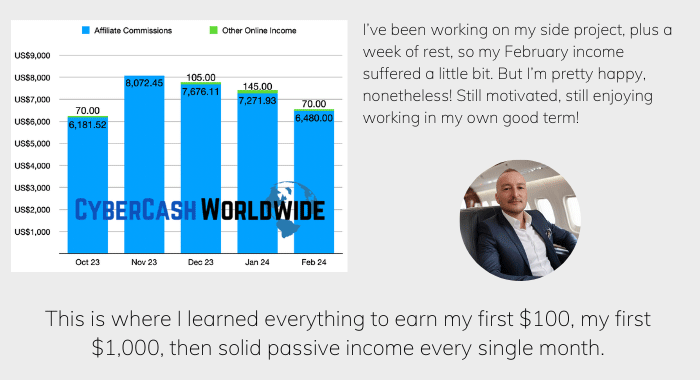
How I "Finally" Make Over $7,000 Monthly Income
"The most valuable thing I've ever done!"
Unexpected Data Collection From Leisure Activities
Even hobbies and leisurely pursuits are now ripe for data collection. Many retirees are unaware of how their favorite activities expose them to privacy risks.
- Online classes request detailed profiles. Virtual classes for painting or cooking often ask for more information than needed. This data could then be used to target ads or sold to third parties.
- Social media groups for hobbies track interests. Joining a gardening or knitting group online generates detailed interest profiles. These profiles are used to predict buying habits.
- Booking travel online tracks locations. Retirees booking vacations through travel sites often have their preferences saved. These records could be shared with marketing companies or even hackers.
- Fitness centers use apps that monitor progress. Gym apps often require detailed personal data, such as weight or exercise history. Such information may be stored indefinitely or shared without notice.
Are you willing to trade your leisure time for the cost of your personal data? How can you make your hobbies more private while still enjoying them?
Password Hygiene and Management Tactics
Repeat passwords are a common mistake that allows one breach to compromise your entire life. If a hacker gets your login for a small forum, they will try it on your bank. Most people use simple words or dates that are easy for computers to guess in seconds. Long phrases with a mix of characters are much harder to crack using brute-force methods. You need a different, complex password for every single service you use online.
Password managers take the stress out of remembering dozens of complicated login strings. These vaults store your credentials behind a single, highly secure master key. They can generate random passwords that are nearly impossible for humans or machines to predict. Your vault is encrypted so that even the service provider cannot see your sensitive data. Synchronization across devices ensures you have your keys whenever and wherever you need them.
Leaked databases often contain millions of passwords from various online services and stores. You should check if your email has been part of a breach using specialized search sites. Change your credentials immediately if you find that a service you use has been compromised. Security questions about your mother's maiden name or your first car are easy to find on social media. You should use fake answers for these questions to add another layer of protection.
Create a unique master password for your password manager that you never use elsewhere. A strong foundation for your digital vault is the most critical part of your setup.
Enable alerts for compromised passwords within your browser or security software. Immediate action is required when you find out that a site has lost your data.
Use long sentences as passwords to increase the time it takes for a computer to crack them. Phrases are easier to remember than random strings of gibberish and symbols.
Multi-Factor Authentication as a Safety Net
Single passwords are no longer enough to keep professional hackers out of your private life. Multi-factor authentication requires a second form of ID before granting access to your account. This code usually arrives via a text message, an app, or a physical security key. Even if a thief steals your password, they cannot get in without your physical device. You should enable this feature on every account that contains financial or personal information.
Text message codes are the most common form of secondary security for many users. Sophisticated scammers can steal your phone number through a process called SIM swapping. Authentication apps that generate codes locally on your phone are a much more secure option. These apps do not rely on the cellular network to provide you with your login tokens. Physical keys that plug into your USB port offer the highest level of security available today.
Backup codes are provided when you first set up your secondary security measures. You must store these in a safe, physical location in case you lose your primary phone. Without these codes, you might find yourself locked out of your own accounts permanently. Recovery processes for high-security accounts are intentionally slow and difficult to complete. Preparation is the only way to ensure you retain access to your digital world.
Install an authentication app on your smartphone to replace insecure text message codes. Local code generation is a much more robust way to protect your logins.
Print your backup recovery codes and keep them in a fireproof home safe. Physical copies are the only way to recover your accounts if your phone is destroyed.
Purchase a hardware security key for your most sensitive financial and email accounts. These physical devices are nearly impossible for remote hackers to bypass or spoof.
Social Engineering and the Human Element

Criminals often find that it is easier to trick a human than to hack a computer. Social engineering involves manipulating your emotions to get you to reveal secret information. Scammers might pretend to be a grandchild in trouble or a government official with a warrant. They use a sense of urgency to stop you from thinking clearly about the request. You should always hang up and call the official number of the organization they claim to represent.
Phishing emails look like legitimate messages from your bank or a popular online store. They contain links to fake login pages that look identical to the real ones you use. Hovering your mouse over a link reveals the true destination of the URL before you click it. Large companies will never ask for your password or social security number over an email. You must treat every unexpected message with a high degree of skepticism and caution.
Social media provides a wealth of information for people who want to craft a convincing lie. Your birth date, pet names, and vacation photos are all clues that hackers can use against you. Oversharing creates a roadmap that scammers follow to build trust with their targets. You should limit the amount of personal detail you post on public forums and profiles. Silence is a powerful way to protect your privacy and your financial future.
Verify the identity of any caller who asks for money or personal information immediately. Use a separate phone to call the company back and confirm the request is real.
Inspect the sender's email address for small typos or unusual domain names. Scammers often use addresses that look very close to the real thing to fool you.
Ignore any message that demands you take action within a few minutes to avoid a penalty. Pressure is a classic tactic used to bypass your logical thinking and common sense.
Secure Communication and Encrypted Messaging
Traditional text messages and emails are like postcards that anyone can read in transit. They pass through many servers where they can be intercepted or stored for years. Encrypted messaging apps ensure that only you and the recipient can read the content. These services use end-to-end encryption to scramble your words before they leave your device. You can send photos and sensitive documents without worrying about who might be watching.
Metadata is the information about your messages, such as who you talked to and when. Some apps protect the content but still sell your metadata to interested advertising firms. You should look for services that minimize the amount of data they collect about your habits. Self-destructing messages allow you to set a timer for how long a conversation remains visible. This feature prevents old chats from sitting on a server or a device indefinitely.
Email encryption is a more complex process but is necessary for sending financial documents. You can use specialized providers that make this security measure easier for the average user. Standard providers often scan your emails to serve you targeted ads based on your words. Switching to a secure host protects your correspondence from both hackers and corporate snoops. Your private thoughts should remain private regardless of the medium you choose to use.
Switch your family group chats to an app that offers end-to-end encryption by default. Privacy should be the standard for your private conversations with the people you love.
Set your sensitive messages to disappear after a week to reduce your digital footprint. Keeping your history clean prevents old data from being used against you later.
Use an encrypted email service when communicating with your lawyer or financial advisor. Protecting these high-stakes documents is a vital part of your overall security plan.
The Risks of the Internet of Things (IoT)
Smart devices like thermostats and cameras bring convenience but also introduce new threats. These items are often built with poor security and rarely receive software updates from makers. A single compromised light bulb can give a hacker access to your entire home network. You should change the default passwords on every smart device as soon as you plug it in. Many of these products are constantly listening or watching within your most private spaces.
Voice assistants are always waiting for a "wake word" and recording audio in your home. This data is often sent to the cloud where human contractors might review it for accuracy. You can disable the microphones on these devices when you are not actively using them for tasks. Smart locks provide an entry point for burglars who are tech-savvy enough to exploit them. You must weigh the benefits of automation against the potential loss of your home's privacy.
Home networks should be divided into sections to keep your smart devices separate from your computers. A "guest network" for your IoT items prevents them from seeing your private files and backups. You should also check the privacy policies of the companies that make your smart gadgets. Some firms sell your usage patterns to insurance companies or marketing agencies for profit. Control over your environment starts with controlling the data your house generates.
Create a separate Wi-Fi network specifically for your smart home devices and gadgets. Isolation prevents a cheap smart plug from becoming a gateway to your primary computer.
Mute the microphone on your voice assistant when you are having private conversations. Physical switches are the only way to be sure that your device is not listening.
Update the firmware on your router and smart devices at least once every month. Manufacturers release fixes for bugs that could leave your home open to remote attacks.
Search Engine Tracking and Anonymity
Search engines record every query you type to build a detailed psychological profile of you. They know your health concerns, your political leanings, and your secret desires for the future. This information is used to manipulate the results you see and the ads you encounter. You are often trapped in a bubble of information that only shows you what you already believe. Breaking out of this cycle requires using tools that do not track your search history.
Alternative search engines provide the same results without the invasive tracking of larger firms. They do not store your IP address or use cookies to follow you across the web. You can find the information you need without leaving a permanent record of your curiosity. Some of these services even plant trees or support charities with their advertising revenue. Making the switch is as simple as changing a single setting in your favorite browser.
History settings in your browser should be set to clear automatically when you close the window. Keeping years of search data on your local machine is a risk if your computer is ever stolen. You can also use "incognito" windows for quick searches that you do not want to be saved. These modes do not make you invisible to the websites you visit or your ISP. True privacy requires a combination of the right tools and the right habits every day.
Set an alternative search engine as your default to stop the constant tracking of your queries. You will get the same information without giving away your personal secrets to a corporation.
Clear your search history and cache at the end of every day to keep your data private. Removing local records prevents anyone with access to your computer from seeing your history.
Use a browser that blocks cross-site trackers from following you from one site to another. Blocking these hidden elements speeds up your browsing and protects your identity online.
Cloud Storage Security and Data Leaks
Storing your photos and documents in the cloud is convenient for accessing them anywhere. Most people do not realize that the service provider can often see their private files. If their servers are hacked, your entire digital life could be exposed to the public. You should use client-side encryption to scramble your files before they ever leave your computer. This ensures that only you have the keys to unlock your data in the cloud.
Backup routines are necessary to prevent the loss of your precious memories to a hardware failure. You should have at least three copies of your most important data in different locations. One copy should be physical, such as an external hard drive kept in a safe place. Relying entirely on a single cloud provider is a recipe for disaster if they close your account. Diversification is just as important for your data as it is for your retirement funds.
File sharing through the cloud often leaves links active long after they are needed by others. You should set expiration dates on any links you send to friends or family members. Regularly audit your shared folders to see who still has access to your private information. Revoke permissions for old collaborators or services that you no longer use for your work. Your digital attic needs a thorough cleaning at least once or twice every year.
Encrypt your sensitive documents using a third-party tool before uploading them to the cloud. Scrambling the data locally means the provider can never read your private information.
Enable two-factor authentication on your cloud storage accounts to prevent unauthorized access. An extra layer of security is vital for the place where you store your life's history.
Maintain a physical backup of your photos on a high-capacity external hard drive at home. Offline storage is the only way to be 100% sure your data is safe from hackers.
Online Shopping Safety and Credit Privacy

Shopping from home is a great way to save time and find rare items for your hobbies. It also exposes your credit card details to various databases that might not be secure. You should use virtual card numbers that are tied to a single merchant or a specific amount. These temporary numbers prevent a breach at one store from affecting your main bank account. Always look for the padlock icon in your browser before entering any financial details.
Marketplaces like those found on social media are filled with scams targeting unsuspecting buyers. If a price seems too low, it is almost certainly a fraudulent listing designed to steal your money. You should never pay for items using wire transfers or gift cards that cannot be tracked. Use a credit card for all online purchases to take advantage of fraud protection laws. Debit cards offer much less protection and give thieves direct access to your cash.
Account history should be reviewed every week to spot any unauthorized charges immediately. Small "test" charges are often a sign that your card details have been stolen by a criminal. You can set up real-time alerts on your phone for every transaction that occurs on your account. Reporting fraud as soon as it happens limits your liability and helps the bank catch the thief. Being proactive with your finances is the best way to enjoy your retirement without worry.
Use a dedicated credit card for all of your online shopping to limit your exposure. Keeping one card for the web makes it easier to track your spending and spot errors.
Create virtual credit card numbers through your bank's app for one-time purchases. These numbers expire after use and cannot be reused by scammers who steal them.
Check your credit report every three months to look for any accounts opened in your name. Monitoring your credit is the only way to catch identity theft before it ruins your score.
Health Data Privacy in the Digital Age
Medical records are moving to online portals that allow you to see your results from home. This convenience comes with the risk of your sensitive health history being leaked or sold. Insurance companies and employers would love to get their hands on your private medical data. You should use strong, unique passwords for every health portal you are required to use. Be careful about the apps you use to track your fitness or your daily sleep patterns.
Wearable devices collect a massive amount of data about your heart rate and your movements. This information is often sent to the cloud where it is analyzed by unknown algorithms and teams. You should read the privacy policy to see if the manufacturer shares this data with third parties. Some life insurance firms offer discounts in exchange for access to your fitness tracker data. You must decide if the small savings are worth the total loss of your medical privacy.
Privacy laws regarding health data vary wildly depending on where you live and which service you use. Not every app that tracks your health is covered by the same strict rules as your doctor. You should be cautious about sharing your genetic information with popular ancestry websites and firms. These databases are often accessible to law enforcement and can be sold to pharmaceutical companies. Your DNA is the most personal piece of data you will ever own in your life.
Limit the amount of personal health information you share with free fitness tracking apps. Many of these services make money by selling your health trends to large marketing firms.
Ask your doctor about the security measures they use to protect your digital medical records. Knowing how your data is handled will help you feel more secure about your privacy.
Think twice before submitting your DNA to a website for ancestry or health insights. Your genetic code cannot be changed if the database is hacked or sold to a third party.
AI-Generated Scams and Future Threats
Artificial intelligence is making it easier for criminals to create realistic fakes of people you know. They can clone a voice from a short video clip found on your social media profile. A "family member" might call you asking for money in a voice that sounds exactly like them. You should establish a "secret word" with your loved ones to verify their identity in an emergency. These deepfake technologies are becoming more common and much more difficult to spot.
Automated bots can send out millions of personalized phishing emails in a single hour of work. These messages use data from your social media to make the lies feel much more personal. They might mention a recent trip you took or a hobby that you frequently talk about online. The level of sophistication in these attacks is growing faster than most people can keep up with. You must remain skeptical of any request for money regardless of how "real" it seems.
Security tools are also using AI to help protect you from these advanced and evolving threats. Modern antivirus software can spot patterns of behavior that indicate a new type of malware. You should use these tools to give yourself an edge against the criminals who use the same tech. Education is your most powerful defense against a world that is changing at a rapid pace. Staying informed about the latest scams will keep you one step ahead of the bad actors.
Establish a secret phrase with your family to use during emergency phone calls. This simple step prevents you from being fooled by a realistic voice-cloning scam.
Be wary of any video or audio that asks you to move money to a new account quickly. Scammers use deepfakes to create a false sense of urgency and bypass your logic.
Use an AI-powered security suite that can detect and block sophisticated phishing attempts. Technology is the only way to fight against the automated attacks of the future.
Digital Inheritance and Legacy Planning
Your digital life will continue to exist long after you have moved on from this world. Accounts for social media and email can remain active and vulnerable if you do not plan. You should decide what happens to your photos and your private messages in your final will. Many services allow you to name a "legacy contact" who can manage your account later. This person can download your memories or close the account to prevent any future identity theft.
Legal documents regarding your digital assets are just as meaningful as your physical property today. You must ensure your executor has a way to access your password manager and your devices. Without a plan, your family might have to go to court to see your final photos and files. Some people choose to have their accounts deleted entirely to preserve their privacy forever. You should make these choices now while you have the clarity and the time to do so.
Memories stored on social media can be lost if a company goes out of business or changes its rules. You should regularly download your data and store it on a physical drive for your family. This ensures that your personal history is preserved in a format that does not require a login. Your digital legacy is a part of the story you leave behind for future generations of your family. Planning for the end of your digital life is the final act of a responsible retiree.
Appoint a trusted legacy contact within your major social media and email accounts. Giving someone the authority to manage your data ensures your wishes are followed.
Include instructions for your digital accounts in your legal will or your estate plan. Your family needs a clear roadmap to handle your online presence after you are gone.
Download a full archive of your social media data once a year and save it to a drive. Keeping a local copy of your history ensures your memories are never lost to a server crash.

Wacky Ways to Take Back Control
Privacy concerns may feel overwhelming, but creative and unconventional methods can help retirees regain some control over their data.
- Create false profiles for online accounts. When signing up for services, use alternative names or details. This simple trick can help protect your identity and make tracking more difficult.
- Use low-tech solutions instead of smart devices. Swap a smart thermostat for a manual one or use a traditional radio instead of a smart speaker. These changes limit unnecessary data collection.
- Wrap smart devices in foil when not in use. This may sound strange, but it can block certain signals, ensuring the devices aren’t listening. It’s a simple and effective hack for privacy-conscious individuals.
- Opt for cash payments whenever possible. Using cash instead of cards reduces the digital trail you leave behind. This can make it harder for companies to track your spending habits.
Could embracing these quirky tactics make privacy fun? How far would you go to outsmart modern surveillance?
Fun Experiments to Outsmart Surveillance
Taking back privacy doesn’t have to be dull. Retirees can turn it into a series of entertaining experiments to feel more in control.
- Speak in code around smart devices. Replace common phrases with quirky alternatives when discussing personal matters. This confuses data algorithms and makes collected information less useful.
- Set up decoy searches online. Regularly search for topics you have no real interest in. This creates a misleading digital profile that advertisers find hard to interpret.
- Dress like someone else when shopping. Wear hats or glasses that obscure your features in public. Some facial recognition systems struggle with subtle disguises.
- Share misinformation on social media. Post fictitious updates about hobbies or interests to throw off algorithms. It’s a fun way to confuse data collectors.
Could these playful tactics create a digital camouflage? Would making privacy playful change your perspective on personal data?
Rethinking Privacy in Retirement
While technology and data collection feel inescapable, retirees can rethink their relationship with privacy. Adopting a skeptical mindset and proactive habits could make all the difference.
- Ask questions about devices before buying. Always inquire how a product collects and uses data. This helps you decide which gadgets align with your privacy preferences.
- Disable unnecessary features. Turn off voice activation or data-sharing options on devices. These small changes can significantly reduce privacy risks.
- Hold tech-free days. Dedicate certain days to completely unplugging from smart devices. Use this time to enjoy low-tech activities like reading or gardening.
- Join privacy advocacy groups. Participate in local meetups or online forums focused on privacy rights. Sharing tips and insights can empower individuals to take collective action.
How much of your personal data is truly necessary for convenience? Could prioritizing privacy improve your peace of mind?
Retirement Dream Turning Into a Privacy Nightmare
Managing your digital life is a continuous task that requires a proactive mindset and a bit of effort. You will find that the peace of mind you gain is worth every minute spent on security. Retirement should be a time of joy and exploration rather than a period of fear and loss. By taking these steps, you protect the wealth and the memories you have worked so hard to build. The internet is a vast world with many rewards for those who know how to stay safe.
Your privacy is a fundamental right that deserves your full attention and your constant protection. Staying one step ahead of scammers is the best way to ensure your golden years remain truly golden. Every action you take today builds a wall around your future self and your family. You have the power to turn the digital nightmare back into the dream you always wanted. Enjoy your freedom with the confidence that comes from being well-prepared for any threat.
(Real Time) Affiliate Income Report Last Month